

Online & Hybrid Learning
UNC Online & Hybrid Learning

How Do Online Courses Work?
Online courses at our university are designed for busy adults like you. Here is what you can expect:
A Clear Schedule and Deadlines
- Learn Anytime, Anywhere: You have the freedom to log in whenever it works for you. Note: some programs do have courses that include weekly scheduled class sessions. See program pages for details.
- Weekly Schedule: Most courses have weekly deadlines for assignments and discussions. This schedule keeps you on track and helps you build a community with your classmates.
A Quality University Education
- Focused on Outcomes: Our online offerings help you reach your personal and professional goals. We’re here to help you advance or change your career.
- High Standards: You’ll learn from our renowned instructors, who are ready to challenge you. Nothing is compromised online – the only thing that changes is where you are while you learn.
- The UNC Community: You’ll get to know your instructors and classmates as you learn. But you’ll also be joining our UNC community. Once a Bear, always a Bear!
You can learn even more about online courses below.
How Do Hybrid Courses Work?
The simple definition of hybrid learning is that some coursework is completed online and some in-person.
- The online elements reduce the time you spend in person (compared to an in-person course).
- What this means for a specific program may vary. A hybrid program might have hybrid delivery for all courses, or might have some courses fully online and some courses hybrid or in-person. Program pages will explain any hybrid delivery.
What is “Mostly Online”?
Some of our hybrid programs are “mostly online.” This means that for most of the time you will study fully online. But there is at least some in-person coursework required. This could be a little as a few days, or could be a a few weeks, usually during the summer. Program pages will explain any “mostly online” hybrid delivery.
More About Online Courses
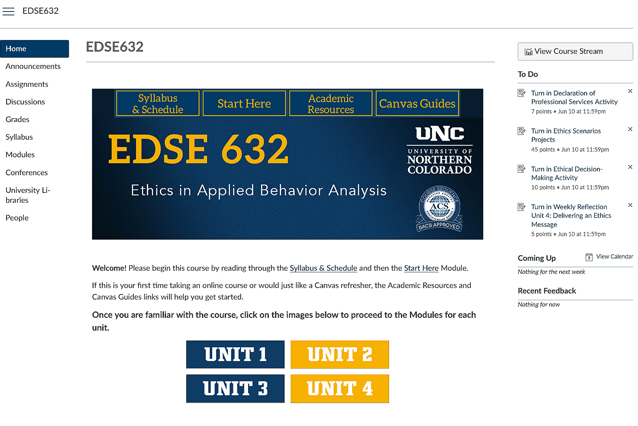
Even though you won’t see your instructor or classmates in person, our online classes work a lot like a traditional classroom.
What the Instructor Does
Your instructor does all the things they would do in a regular class:
- Make announcements.
- Give you materials and describe assignments.
- Ask the class questions and lead discussions.
- Give quizzes and tests.
- Collect your work and give you feedback on your grades.
What You’ll Do
You can also do all the same things you’d do on campus:
- Share information and discuss topics with the instructor or the whole class.
- Work together with classmates on projects.
- Take quizzes and tests and submit your assignments.
- Ask the instructor questions.
- Read and conduct research.
The Main Difference
The biggest difference is how you attend. Attending online can happen two ways:
Asynchronous: This just means “not at the same time.” You don’t have to log in with everyone at the same time. All courses will have at least some asynchronous tasks. In most programs, courses are fully asynchronous.
Synchronous: Some programs include synchronous class times. This is when there are set times when everyone logs in at the same time. If your program requires you to be online at specific times, we will state that in the Course of Study section.
Develop Good Habits
Online learning gives you flexibility, but success depends on building good habits from the start. These quick tips will help you stay on track.
Prepare and Plan Your Time
- Read your syllabus and explore your Canvas course site right away.
- Note assignment deadlines and add them to your personal calendar.
- Block out regular study time each week. Treat it like an in-person class meeting.
- Break big projects into smaller tasks with progress checkpoints.
Stay Organized
- Save your work in more than one place (computer and cloud storage).
- Use clear file names (e.g., ECLD513_Essay1_YourName).
- Keep course work in dedicated folders so it’s easy to find.
Communicate Professionally
- Write clearly and respectfully in discussions and emails.
- Avoid slang or all caps (which can feel like shouting).
- Think before you post. Positive communication helps everyone succeed.
Ask for Help Early
- For technical issues, use the Support link in Canvas or contact the Technical Support Center.
- For course questions, post in a discussion board or email your instructor directly. Check your course Syllabus for how to contact your instructor.
- Don’t wait until you’re stuck. Reaching out early will save you time and reduce your stress.
Final Note
Online learning is flexible, but it takes planning and persistence. Stay organized, manage your time, and ask for help when you need it. You’ve got this!
Have a Dependable Desktop or Laptop
You don’t need the latest, greatest computer. You need dependable basics, including:
- A reliable internet connection.
- A desktop or laptop with an updated operating system and updated software.
- Microsoft Office (available free to all UNC students).
- A updated PDF reader, such as Adobe Acrobat.
- Webcam and microphone for live sessions and proctored exams.
View the current requirements and technical tips for using Canvas.
You can also access UNC’s Information Management & Technology support for new students.
Use Mobile Devices Wisely
Canvas apps for iOS and Android make it easy to check announcements or discussions on the go. Don’t rely on a phone or table for exams or major assignments. Use a computer for the best experience.